02 熟悉Urllib库

三、Urllib库

1. Urllib基础

方法

urlretrieve() 爬一个网页
urlcleanup() 清除urlretrieve()生成的缓存
info() 展现基本环境信息
getcode() 当前网页的状态码
geturl() 当前网页的网址
1
2
3
4
5
6
7
8
9
10
11
import urllib.request
import ssl

ssl._create_default_https_context = ssl._create_unverified_context

urllib.request.urlretrieve("http://hellobi.com",filename="/Users/biandudu/Documents/webcrawerfiles/1.html")
urllib.request.urlcleanup()
file = urllib.request.urlopen("http://www.hellobi.com",timeout=5)
print(file.info())
print(file.getcode())
print(file.geturl())

2. 超时设置 并抛出异常

有些网站反应快,我们希望2秒钟没有反应,则判断为超时,那么此时,timeout的值就是2,再比如,有些网站服务器反应慢,那么此时,我们希望100秒没有反应,才判断为超时,那么此时timeout的值就是100。

1
2
3
4
5
6
7
8
9
10
11
12
13
14
import urllib.request
import ssl

ssl._create_default_https_context = ssl._create_unverified_context

for i in range(1,30):
try:
file = urllib.request.urlopen("http://hellobi.com", timeout=0.5)
data = file.read()
print(len(data))
except Exception as e:
print("异常:"+str(e))

file.close()

3. 自动模拟HTTP请求

客户端如果要与服务器端进行通信,需要通过http请求进行,http请求有很多种,我们在此会讲post与get两种请求方式。比如登陆、搜索某些信息的时候会用到。

1
2
3
4
5
6
7
8
9
10
11
12
13
import urllib.request
import ssl

ssl._create_default_https_context = ssl._create_unverified_context

keywd = "张译天"
keywd = urllib.request.quote(keywd) # 对中文编码
url = "http://www.baidu.com/s?wd="+keywd+"&ie=utf-8&tn=96542061_hao_pg"
req = urllib.request.Request(url)
data = urllib.request.urlopen(req).read()
fh = open("/Users/biandudu/Documents/webcrawerfiles/2.html","wb")
fh.write(data)
fh.close()
自动提交post请求

首先登陆这个网站:www.iqianyue.com/mypost/ 并分析源码

1
2
3
4
5
6
7
8
9
10
11
12
13
14
15
16
17
18
19
import urllib.request
import urllib.parse
import ssl

ssl._create_default_https_context = ssl._create_unverified_context

# 设置表单内容
url = "http://www.iqianyue.com/mypost/"
mydata = urllib.parse.urlencode({
"name":"ceo@sfsfd",
"pass":"1232jas"
}).encode("utf-8") # 设置对应的信息,对应的编码

# 封装请求
req = urllib.request.Request(url,mydata) # 提交到的地址,提交的数据
data = urllib.request.urlopen(req).read() # urlopen将对应请求提交过去,爬数据
fh = open("/Users/biandudu/Documents/webcrawerfiles/3.html","wb") # 写入本地文件,wb二进制写入
fh.write(data)
fh.close()

Tips:

  • 找到登录,只需要关注 form 里的 name属性
  • 找不到登录,隐藏在js文件中,我们需要通过 抓包 来进行分析

4. 异常处理

301 Moved Permanently 重定向到新的URL,永久性
302 Found 重定向到临时的URL,非永久性
304 Not Modified 请求的资源未更新
400 Bad Request 非法请求
401 Unauthorized 请求未经授权
403 Forbidden 禁止访问
404 Not Found 未找到对应页面
500 Internal Server Error 服务器内部错误
501 Not Implemented 服务器不支持实现请求所需要的功能
URLError和HTTPError
1
2
3
4
5
6
7
8
9
10
11
12
13
import urllib.error
import urllib.request
import ssl

ssl._create_default_https_context = ssl._create_unverified_context

try:
urllib.request.urlopen("http://blog.csdksdfjs.net/dsd") # csdn爬取会被屏蔽
except urllib.error.URLError as e: # 捕获异常
if hasattr(e,"code"): # 是否有这个状态码属性,判断有没有code
print(e.code)
if hasattr(e,"reason"): # 判断是否有reason这个属性
print(e.reason)

5. 浏览器伪装技术

我们可以试试爬取csdn博客,我们发现会返回403,因为对方服务器会 对爬虫进行屏蔽。此时,我们需要伪装成浏览器才能爬取。
浏览器伪装我们一般通过报头进行,接下来我们通过实战分析一下。
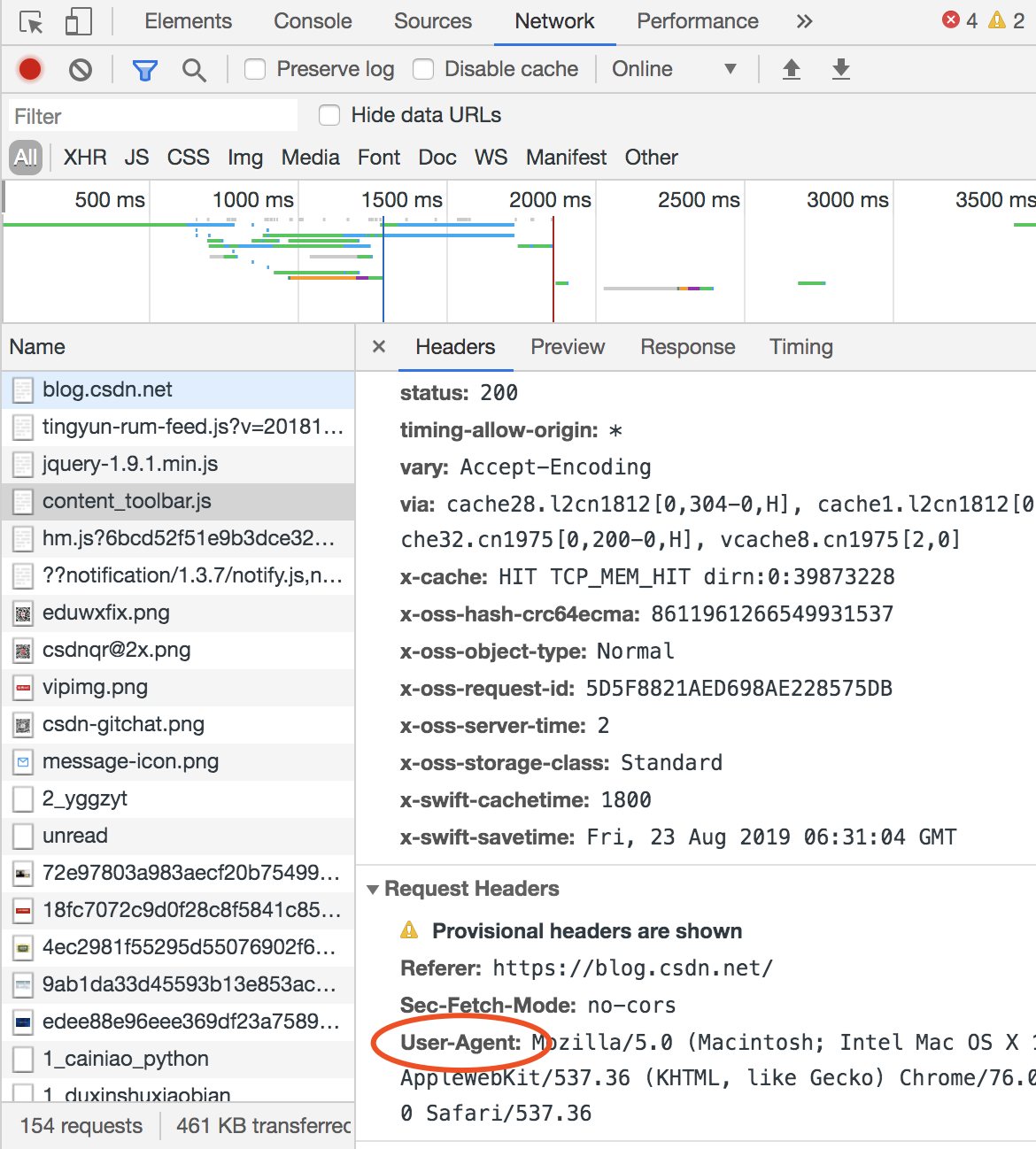
User-Agent

如果没有伪装会报403禁止访问错误
1
2
3
4
5
6
7
8
9
10
11
12
13
14
import urllib.request
import ssl

ssl._create_default_https_context = ssl._create_unverified_context

url = "https://ask.hellobi.com/blog/weiwei/5322"
headers=("User-Agent","Mozilla/5.0 (Macintosh; Intel Mac OS X 10_13_6) AppleWebKit/537.36 (KHTML, like Gecko) Chrome/76.0.3809.100 Safari/537.36")
opener = urllib.request.build_opener() # 创建一个opener对象
opener.addheaders = [headers] # 添加报头信息

data = opener.open(url).read()
fh = open("/Users/biandudu/Documents/webcrawerfiles/6.html","wb")
fh.write(data)
fh.close()

6. Python新闻爬虫实战

需求:将新浪新闻首页(http://news.sina.com.cn/)所有新闻都爬到 本地。

思路:先爬首页,通过正则获取所有新闻链接,然后依次爬各新闻,并
存储到本地。

1
2
3
4
5
6
7
8
9
10
11
12
13
14
15
16
import urllib.request
import re
import ssl

ssl._create_default_https_context = ssl._create_unverified_context

data = urllib.request.urlopen("http://news.sina.com.cn/").read()
data2 = data.decode("utf-8","ignore") # 有时候设置utf-8还会报错,就添加一个ignore

pat='href="(https://news.sina.com.cn/.*?)"'
allurl = re.compile(pat).findall(data2)

for i in range(0,len(allurl)):
thisurl = allurl[i]
file = "/Users/biandudu/Documents/webcrawerfiles/sinanews/"+str(i)+".html"
urllib.request.urlretrieve(thisurl,file)

作业三: 提取出版社信息并写入文件中

1
2
3
4
5
6
7
8
9
10
11
12
13
14
15
16
17
18
19
20
21
22
23
24
25
26
27
28
29
30
31
32
33
34
35
36
37
38
39
40
41
42
43
44
45
46
47
48
49
50
51
52
53
54
55
from urllib import request
import re,xlwt,datetime

html=request.urlopen("https://read.douban.com/provider/all").read() #读取网页源代码内容
html.decode("utf-8")
wzgz="<a href=\"(.*?)\" class=\"provider-item\"><div class=\"col-media\"><div class=\"cm-left avatar\"><div class=\"avatar\"><img src=\"(.*?)\"/></div></div><div class=\"cm-body\"><div class=\"name\">(.*?)</div><div class=\"works-num\">(.*?) 部作品在售</div></div></div></a>"
xx=re.compile(wzgz).findall(str(html,"utf-8")) #通过正则表达式匹配在网页源代码中提取所需内容
#print(xx)

#创建workbook和sheet对象
workbook = xlwt.Workbook()
sheet1 = workbook.add_sheet('sheet1',cell_overwrite_ok=True)

#初始化excel样式
style = xlwt.XFStyle()

#为样式创建字体
font = xlwt.Font()
font.name = 'Times New Roman'
font.bold = True

#设置样式的字体
style.font = font

#在sheet1表的第1行设置字段名称并写入数据
sheet1.write(0,0,"序号",style)
sheet1.write(0,1,"出版社-URL",style)
sheet1.write(0,2,"LOGO-URL",style)
sheet1.write(0,3,"出版社名称",style)
sheet1.write(0,4,"在售作品数量",style)

a=0 #定义行号初始值
h=0 #定义在售数量初始值
for i in xx:
#print(str(a+1),i[0])
sheet1.write(a+1,0,a+1,style) #在第a+1行第1列写入序号
sheet1.write(a+1,1,"https://read.douban.com"+str(i[0]),style) #在第a+1行第2列写入出版社URL
sheet1.write(a+1,2,i[1],style) #在第a+1行第3列写入LOGO-URL
sheet1.write(a+1,3,i[2],style) #在第a+1行第4列写入出版社名称
sheet1.write(a+1,4,int(i[3]),style) #在第a+1行第5列写入在售数量
h+=int(i[3]) #在售数量累计求和
a+=1

if a==a: #判断XX列表是否遍历结束,并在sheet1表尾行写入在售数量求和的值
t=datetime.datetime.now().strftime("%Y-%m-%d %H:%M:%S")
t1=datetime.datetime.now().strftime("%Y%m%d%H%M%S")
sheet1.write(a+1,3,"合计",style) #在sheet1表尾行写入“合计”
sheet1.write(a+1,4,h,style) #在sheet1表尾行写入在售数量累计值
sheet1.write(a+2,3,"采集时间",style) #在sheet1表尾行写入数据采集时间
sheet1.write(a+2,4,t,style) #在sheet1表尾行写入数据采集时间

workbook.save("d:/豆瓣出版社汇总表"+str(t1)+".xls") #保存该excel文件,有同名文件时无法直接覆盖

print("数据写入excel文件完毕!")
print("在售书数量合计:"+str(h))
0%